

London, October 15, 2026. Today we launched the Airspeed MCP server, which brings your customer conversations, deal intelligence, and sales playbooks into Claude and ChatGPT. Revenue teams can now ask their AI about any deal and get answers grounded in what their buyers actually said, then let it handle the follow-up: updating the CRM, drafting emails, and setting tasks.
The Airspeed MCP is live in the Claude connector directory and the ChatGPT plugin directory. Teams sign in with their Airspeed account. There is nothing to install and no API key to manage.
We collected the questions we hear most from customers, prospects, and our own team, and answered them below.
The news
What is the Airspeed MCP?
The Airspeed MCP is a connector that links your AI assistant to your Airspeed workspace. MCP stands for Model Context Protocol, the open standard that lets AI assistants like Claude and ChatGPT connect to the tools and data your team uses.
Once it is connected, your AI can draw on everything Airspeed knows about your revenue: every analyzed call, every deal and its risks, your scorecards, playbooks, and forecast.
What exactly launched today?
The Airspeed MCP server is now available to every Airspeed customer and trial user in:
- Claude, through the Claude connector directory
- ChatGPT, through the ChatGPT plugin directory
- Gemini Enterprise, set up with help from Airspeed support
It includes 61 tools across search, company 360, calls, deals, scorecards, forecasts, playbooks, agents, tasks, comments, and call shares.
Why does an AI assistant need Airspeed?
Because your AI is only as good as the context it has.
Claude and ChatGPT can write a strong follow-up email. What they cannot do on their own is know that the CFO joined last Tuesday’s call, that pricing came up twice, or that your champion has gone quiet. That context lives in your conversations and your pipeline. Airspeed captures it automatically and makes it available to your AI.
I already connected my notetaker to Claude. What’s different?
A notetaker gives your AI transcripts, usually one call at a time. Airspeed gives it the whole picture:
- Every call across your team, recorded, analyzed, and scored against your playbook automatically
- Deal intelligence: where each deal stands, MEDDIC or SPICED gaps, flagged risks, CRM fields, and emails
- How your team sells: playbooks, scorecards, and saved agents, so answers follow your process
- Action, not just answers: Airspeed can update deals, submit forecasts, create tasks, and share call clips, within your permissions
Notes tell you what happened. Airspeed gets it done. For a longer look at where the notetaker-plus-chatbot setup stops, read Claude + your notetaker vs. Airspeed.
What you can do with it
How do sales reps use Airspeed in Claude?
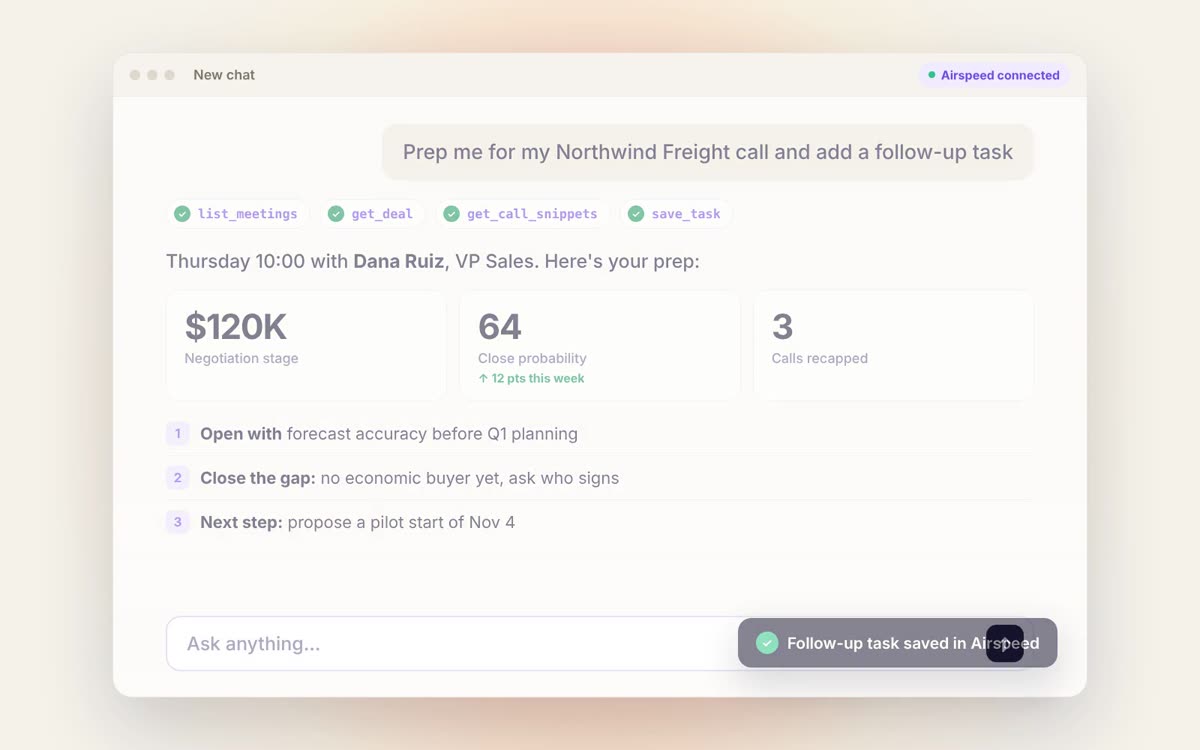
Mostly to walk into calls ready and to stop doing admin. Ask Claude “prep me for my call with Northwind” and it comes back with who is joining, what they pushed back on last time, the exact words they used about pricing, recent emails, and where the deal stands in your CRM. Then ask it to send the Airspeed recorder to the meeting.
How do sales managers use it?
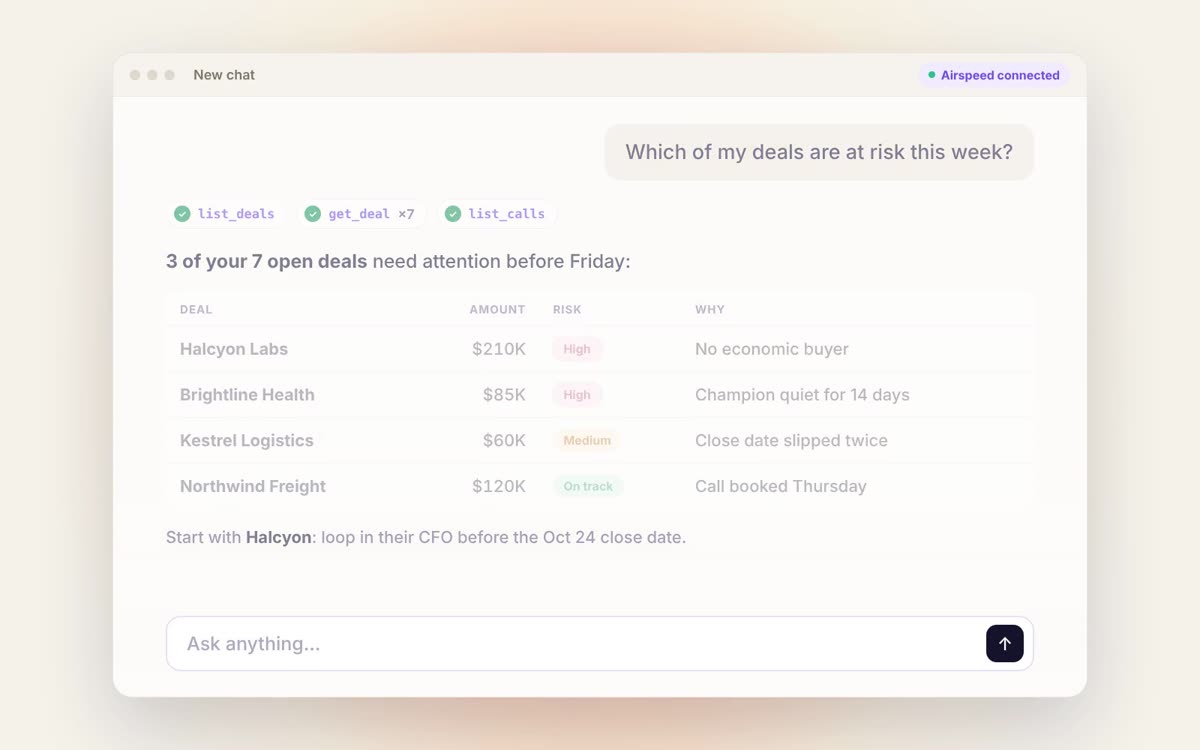
To spot risk early and coach from real calls. Ask “which deals closing this quarter have a new risk since last week?” and you will hear why in your buyers’ own words, before the forecast call. Or ask “who on my team is struggling with discovery, and which call should they learn from?” and share the best minute of that call with just that rep.
How does RevOps use it?
To give the whole team one version of the truth without adding another tool. Every rep’s AI works from the same playbooks, scorecards, and deal data, and every user only sees what their Airspeed permissions allow. Nothing to install, no API keys to rotate.
Can it actually take action, or just answer questions?
It can take action. Try: “Follow up on every deal where pricing came up this week.” Airspeed finds those deals, pulls what each buyer said, drafts a follow-up email for each one, updates the next step in your CRM, and creates a task for you to send them by Friday. One sentence, a whole afternoon of admin done.
Within your permissions, Airspeed in Claude and ChatGPT can:
- Update supported deal fields in your CRM
- Submit your forecast
- Create and complete tasks
- Add comments to calls and deals
- Send the Airspeed recorder to a meeting
- Create viewer-restricted call clips and share links
- Run your saved Airspeed agents
What are good first prompts to try?
- “List my 5 most recent Airspeed calls.” (a quick check that you are connected)
- “What should I know before my next call?”
- “What came up about pricing in this week’s calls?”
- “Show my open deals and where they stand.”
- “How are my team’s scorecards trending this month?”
- “Give me a company 360 for Acme, including people, deals, and recent activity.”
Setup and security
How do I connect Airspeed to Claude?
- Open the Airspeed connector in Claude
- Click connect and sign in with your Airspeed account
- Ask: “List my 5 most recent Airspeed calls.” If you see your real call titles, you are connected.
How do I connect Airspeed to ChatGPT?
Find Airspeed in the ChatGPT plugin directory, install it, and sign in with your Airspeed account when prompted. Which plugins and actions are available depends on your ChatGPT account and workspace settings.
Does it work with Gemini or other AI tools?
Yes. For Gemini Enterprise, write to [email protected] with your Gemini edition and the admin who will configure it, and we will help you set it up. Other assistants that support MCP sign-in can connect using the server URL: mcp.goairspeed.com/mcp-oauth.
Do I need an Airspeed account?
Yes, because Airspeed is where the context comes from. If you are not a customer yet, start the 30-day free trial. Claude and ChatGPT access is included from day one, with no credit card.
Is my data safe? Will my AI see calls I shouldn’t?
No, it will not. You sign in as yourself, so your AI gets exactly your Airspeed access and nothing more. There is no shared organization key.
- Private calls stay with the people who were on them
- Agent runs are visible only to the person who ran them, admins included
- If you cannot see a call in Airspeed, your AI will not find it, or learn that it exists
- Actions only happen where your Airspeed and CRM permissions already allow them
I set up the older API-key connection. What do I do?
The legacy API-key connection has been switched off. Remove it from your assistant and connect again using the steps above, so you do not end up with duplicate tools or sign-in conflicts.
My company uses an allowlist. Will it work?
Yes. Ask your IT team to allow mcp.goairspeed.com and you are set. For everything else, including every tool and permission, see the full Airspeed MCP Server guide.
Get started
What’s next for Airspeed in Claude and ChatGPT?
More tools, and more ways to put them to work. Our co-founders Adam Liska and Devang Agrawal will share more over the coming weeks on where AI-first revenue software is heading.
Your AI was always smart. Now it has the context.
Already on Airspeed? Connect it to Claude or ChatGPT in under a minute. New to Airspeed? Start your 30-day free trial and it is in your AI from day one.
Frequently asked questions
What is an MCP server for sales?
An MCP server for sales connects an AI assistant like Claude or ChatGPT to your sales data through the Model Context Protocol, an open standard. The Airspeed MCP server gives your AI your analyzed calls, deals and their risks, scorecards, playbooks, and forecast, and lets it act on them within your permissions.
How do I connect Claude to my sales calls?
Open the Airspeed connector in Claude, click connect, and sign in with your Airspeed account. Then ask "List my 5 most recent Airspeed calls." If you see your real call titles, Claude can read every call you have access to in Airspeed. There is nothing to install and no API key.
Can ChatGPT read my CRM?
Yes, through Airspeed. Once you install Airspeed from the ChatGPT plugin directory and sign in, ChatGPT can see where each deal stands, including CRM fields, and can update supported deal fields within your Airspeed and CRM permissions.
Is the Airspeed MCP secure?
Yes. You sign in as yourself, so your AI gets exactly your Airspeed access and nothing more, with no shared organization key. Private calls stay private, agent runs stay with the person who ran them, and actions only happen where your Airspeed and CRM permissions already allow them.