


Every sales leader knows the feeling. It’s week six, the roll-up lands in your inbox, and the number looks fine. Then you open a deal and find a close date that’s been pushed three times, a quote that expires on Friday, and a buying committee nobody has spoken to.
The forecast wasn’t wrong because someone lacked data. Your CRM is full of data. It was wrong because the context behind each deal got lost somewhere between the rep, their manager and you.
That’s the problem Airspeed forecasting is built to solve. Here’s what we think great sales forecasting software should do, and how Airspeed does it.
1. It should start with the full picture of every deal
Most forecasting tools work from what’s in the CRM: stage, amount, close date, category. That’s what the rep typed in. It isn’t what actually happened on the last three calls.
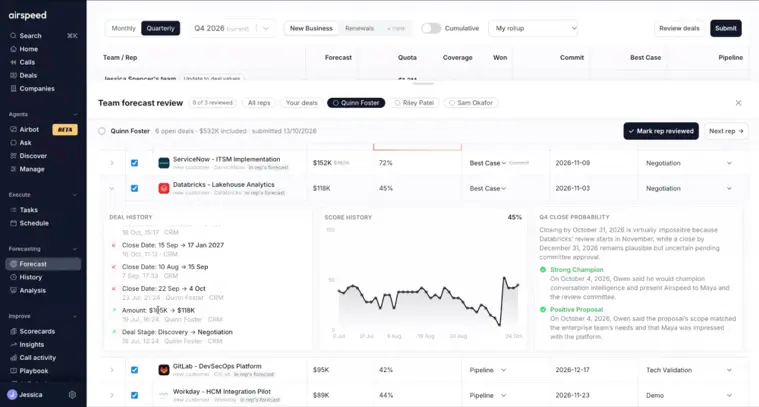
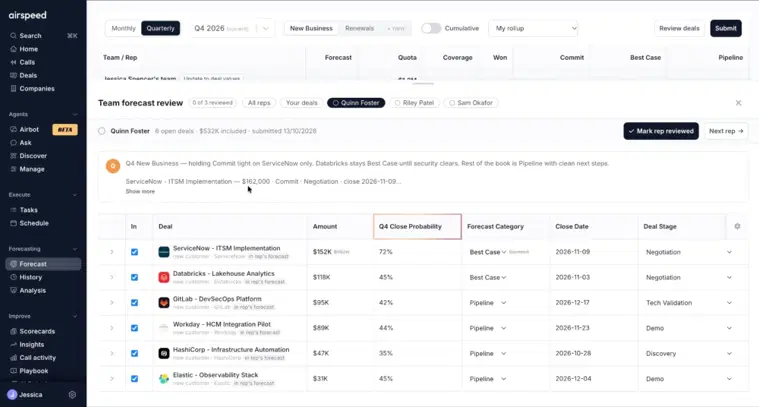
Airspeed reads the context around every deal, including calls, emails, stakeholders and how the deal has moved over time, and turns it into a close probability for the quarter you’re forecasting. When a rep goes to submit their forecast, the deals that matter most are pulled to the top, each with its score.
So a rep looking at a best-case deal sitting at 48% can open the reasoning, see what’s dragging it down, and decide whether best case is still the right home for it, or whether it should drop to pipeline if the number doesn’t move.
2. It should explain its scores, not just show them
A number on its own invites an argument. A number with reasons invites a conversation.
For every deal, Airspeed shows the reasoning behind the latest close probability. Take a deal scoring 45% in negotiation. The reasoning might show a strong champion, a solid proposal and pricing alignment, alongside long gaps between reviews, no sign-off from the buyer’s committee and a quote that’s about to expire. Now you know exactly what to ask the rep.
Airspeed also shows how the score has moved over time. A score that climbs steadily is a healthy sign. One that swings up and down tells you the deal’s direction is genuinely uncertain, and that it deserves a closer look before it goes into anyone’s commit.
3. It should make the roll-up an act of judgment, not data entry
In most organizations, a forecast is only as good as its weakest roll-up. A first-line manager forwards what their reps said, a regional lead forwards that, and by the time it reaches the CRO, nobody has really looked at the deals.
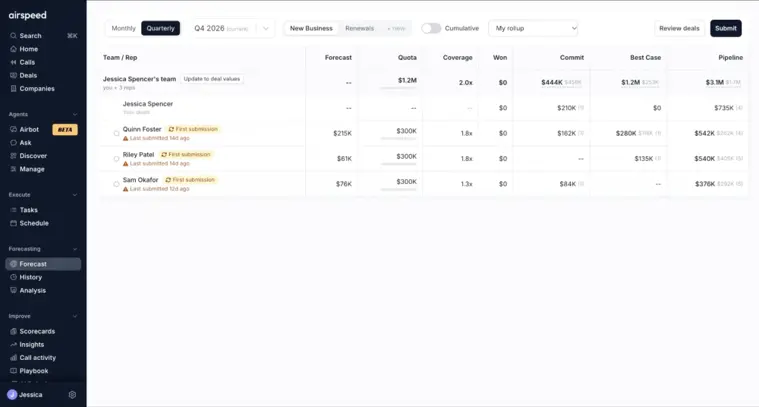
Airspeed’s manager roll-up changes that. Managers see each rep’s submitted numbers next to what their deals actually add up to. If a rep has called $280k in best case and the deals behind it total $118k, that gap is right there on the screen, along with when each rep last submitted. It’s an easy prompt for the next forecast review.
From there, managers can open a review drawer for each rep and work through their deals: stage history, amount changes, close dates that keep slipping, close probability and its reasoning, all in one view.
4. It should let managers make their call without rewriting the rep’s
Here’s a detail we’re particularly proud of. When a manager isn’t convinced by a deal, they can move its category, change its stage, adjust the amount, or exclude it from their roll-up entirely. Those changes apply to the Airspeed forecast only.
The rep’s CRM record stays exactly as they left it. The manager’s view of the deal travels up the hierarchy, and their own manager can see what was adjusted or excluded and why. Nobody has to overwrite anyone else’s work to have an honest forecast conversation.
Once they’re happy, managers update their team totals, give an overall call for the quarter and leave a comment explaining their decisions. Their manager sees that roll-up, can drill into any rep underneath it, and submits their own. Every layer of the hierarchy, from first-line manager to CRO, makes a considered call.
5. It should tell you how good your forecasts actually are
This is the part most forecasting tools skip. It’s one thing to submit a number. It’s another to know how much to trust it.
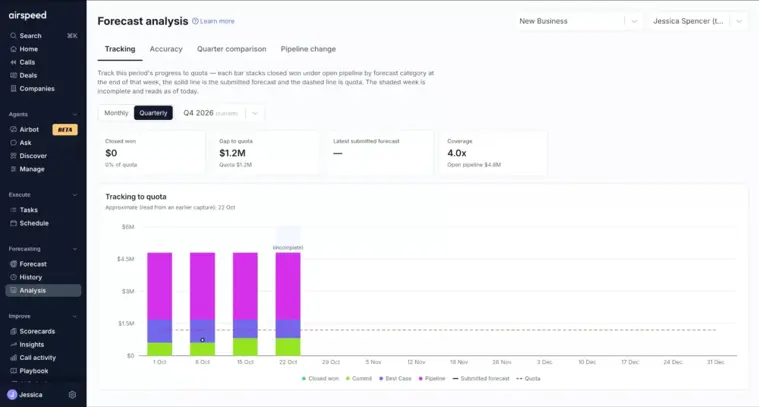
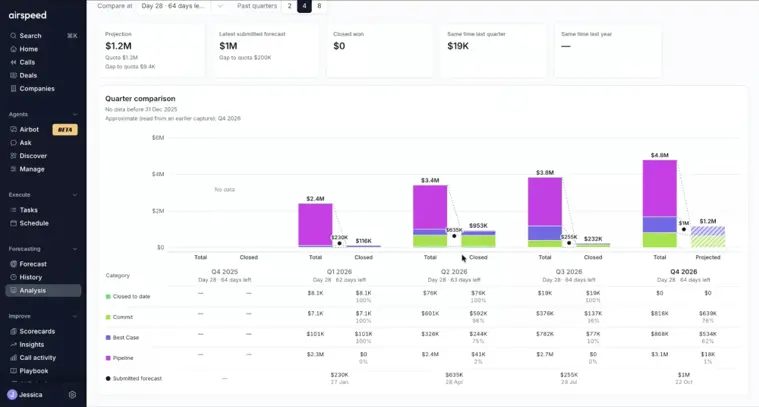
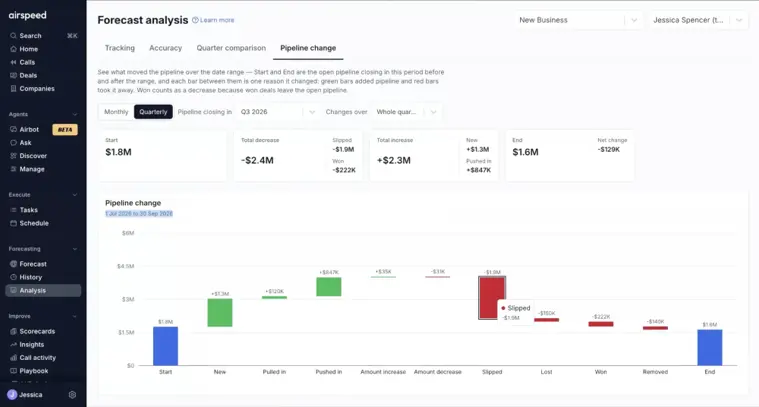
Airspeed’s forecast analysis, now in early access, gives you four views:
- Forecast tracking. Your submitted forecast plotted week by week against pipeline, commit, closed won and quota. You can see whether your forecast sat close to quota all quarter and whether closed won caught up with it.
- Forecast accuracy. How far each quarter’s forecast was from what actually closed, and how quickly it converged. If your team tends to over-forecast early and settle mid-quarter, you’ll see it, and you’ll read this week’s number differently.
- Same point last quarter. If you’re on day 28 with 64 days to go, Airspeed looks at your pipeline at the same point in previous quarters, shows how each category converted, and projects where this quarter is likely to land.
- Pipeline waterfall. Every change to your pipeline across the quarter: new deals, deals pulled in or pushed in, amount changes, slippage, wins, losses and removals. When slippage is the biggest bar on the chart, you know where to dig.

For the bigger picture on why most sales forecasts are wrong and how AI improves forecast accuracy, those two pieces go deeper on the habits behind the number.
Who Airspeed forecasting is for
- CROs and VPs of Sales who want a roll-up where every layer has looked at the same evidence, and a track record that shows how far to trust it.
- Sales managers and regional leads who want to walk into forecast reviews knowing which deals to question and why.
- Reps who want to submit their number with the deal context in front of them rather than from memory.
- RevOps teams who want one forecasting process across the whole hierarchy, without managers overwriting CRM data to make the numbers work.
Still comparing tools? The AI sales forecasting software buyer’s guide covers what to look for, Airspeed vs Clari is the head-to-head, and the best AI sales forecasting platforms roundup covers the wider field.
The bottom line
Forecasting has never really been a data problem. It’s a context problem. Airspeed gives every person in the chain, from the rep to the CRO, the context to make a better call, and then shows you how good those calls have been.
If that sounds like the forecast you’d like to be walking into your next board meeting with, we’d love to show you Airspeed on your own pipeline.
Frequently asked questions
What is sales forecasting software?
Sales forecasting software helps revenue teams predict how much they'll close in a given period. It collects forecasts from reps and managers, rolls them up through the sales hierarchy and tracks them against pipeline and quota.
How is Airspeed different from forecasting in the CRM?
CRM forecasting relies on the fields reps update. Airspeed adds a close probability for each deal, built from calls, emails and deal history, explains the reasoning behind it, and tracks how accurate your forecasts have been over time.
Do manager adjustments change CRM data?
No. Adjustments and exclusions apply to the Airspeed forecast only.
Is forecast analysis available now?
Forecast analysis is in early access. Talk to your Airspeed contact to get it switched on.


