


Over the last couple of months, our product team has been rebuilding how forecasts move through a sales organization. The rep’s submission was always the easy part. The hard part is what happens next, when that number travels up through first-line managers, regional leads and finally the CRO, and loses a little context at every step.
These updates are about keeping that context intact, all the way to the top. Alex, one of our product engineers, walks through all of it in the video below.
A new manager roll-up
Managers now get a dedicated roll-up table for their team. For each rep, they see the forecast submitted in every category, what that rep’s deals actually add up to, and when the forecast was last submitted.
That side-by-side view does a lot of work. A best case of $280k sitting on top of $118k in actual deals is worth a question. So is a forecast submitted weeks ago that no longer reflects the pipeline.
A review drawer for every rep
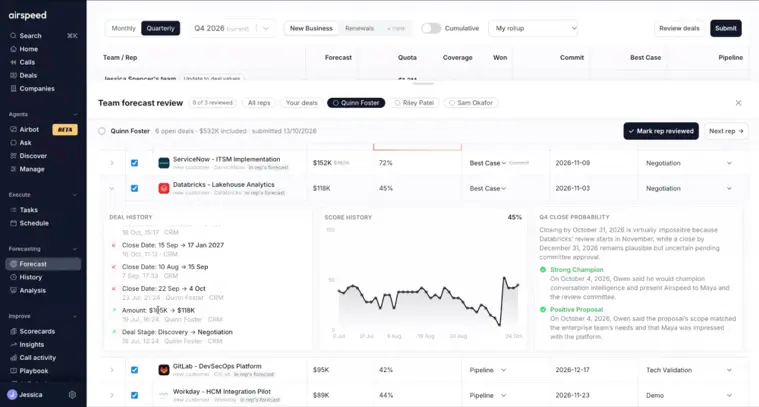
From the roll-up, managers open a review drawer and work through each rep’s deals in a table showing amount, close probability, forecast category and stage. Expand any row to see:
- Deal history: stage changes, amount changes and how often the close date has been pushed
- Close probability history: how Airspeed’s score has moved over time, whether it’s climbing steadily or swinging around
- Reasoning: what’s behind the latest score, from champion strength and pricing alignment to stalled approvals and expiring quotes
Adjustments that don’t touch the CRM
If a manager sees a deal differently, they can change its forecast category, stage or amount, or exclude it from their roll-up entirely. These changes apply to the Airspeed forecast only. The rep’s CRM record stays as it is, and the next level up can see which deals were adjusted or excluded.
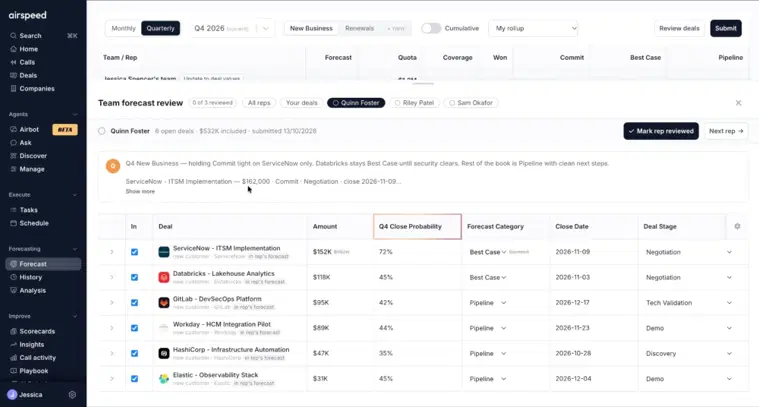
When the review is done, managers update their team totals, give an overall call for the quarter and add a comment for their own manager.
Roll-ups at every level
Each level of the hierarchy sees the roll-ups of the managers below them. A VP of Sales with two regional managers can accept a region’s roll-up as it stands, or drill down to any rep inside it, then submit their own call. The same flow works from first-line manager all the way to the CRO.
Forecast analysis, now in early access
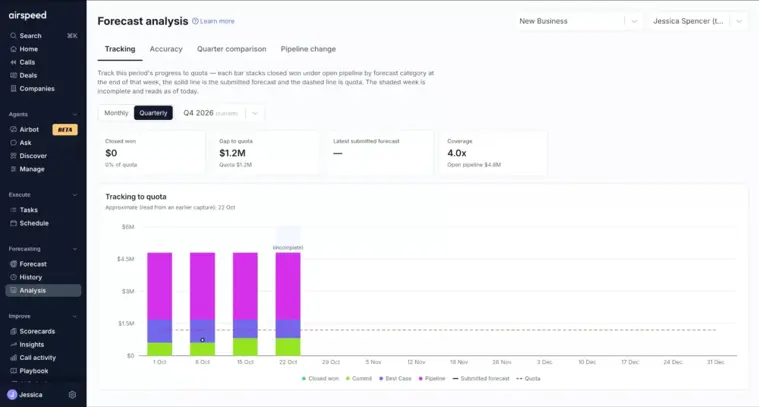
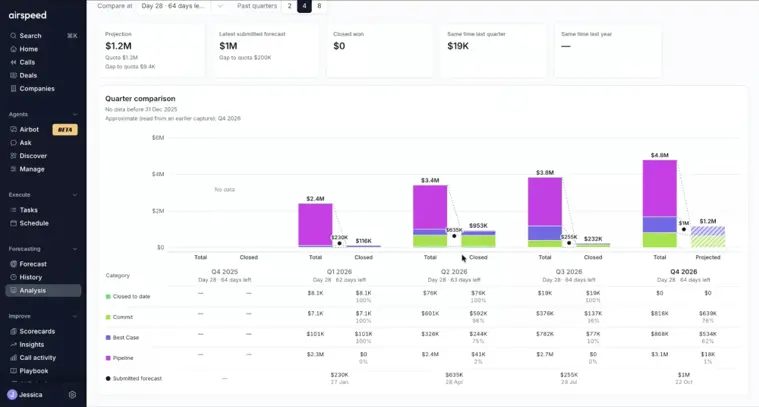
Submitting a forecast is one thing. Knowing how accurate your forecasts tend to be is another. Our new forecast analysis gives you four views:
- Forecast tracking: your submitted forecast week by week against pipeline by category, closed won and quota.
- Forecast accuracy: how far each quarter’s forecast sat from what actually closed, and how quickly it got there.
- Same point last quarter: your pipeline in previous quarters with the same number of days left, how each category converted, and a projection for this quarter.
- Pipeline waterfall: where your pipeline went during the quarter, from new deals, pull-ins and push-ins to amount changes, slippage, wins, losses and removals.

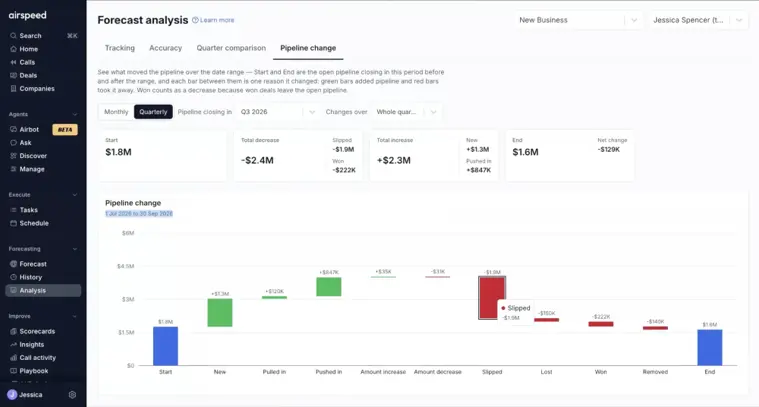
We’re rolling forecast analysis out to customers now. If you’d like it switched on for your team, get in touch with your Airspeed contact.
Why this matters
The best forecast isn’t the one with the most data behind it. It’s the one where every person who touched it had the context to make a good call. With close probability and reasoning on every deal, roll-ups at every level and a clear view of your forecasting track record, that’s what Airspeed forecasting now gives the whole team.
For the full case, read why Airspeed is the best sales forecasting software for revenue teams.
Already a customer? Request early access to forecast analysis from your Airspeed contact.
New to Airspeed? Book a demo and see it on your own pipeline.
Frequently asked questions
Do manager adjustments in Airspeed change CRM data?
No. Category, stage and amount changes, and exclusions, apply to the Airspeed forecast only. The rep's CRM record stays as it is, and the next level up can see which deals were adjusted or excluded.
How do I get forecast analysis?
Forecast analysis is in early access and rolling out to customers now. Get in touch with your Airspeed contact to have it switched on for your team.


