
🤹 Airspeed can now join your conversations on Slack!
We're bringing Airspeed closer to how and where your team works. It can now assist you right in Slack, helping you and your team stay on top of the most important insights from customer interactions and deals. This...
We’re bringing Airspeed closer to how and where your team works. It can now assist you right in Slack, helping you and your team stay on top of the most important insights from customer interactions and deals. This makes information more visible, and allows everyone to make quick, informed decisions, and collaborate more effectively.
How it works
Whenever a message in Slack includes a link to a call in Airspeed, you can simply reply to that message, mention @Airspeed, and ask anything about that call.
This could be a message from a colleague or the automated post-call summary that Airspeed shares after a call 👇
**Awesome! How do I set it up?
**
-
Reconnect Airspeed to your Slack Workspace: Go to the organizational settings in Airspeed and connect it to your Slack workspace.
Important: If it’s already connected, make sure to disconnect, and then reconnect it. This reinstalls Airspeed into your Slack workspace with the necessary permissions for it to get notified when you mention it.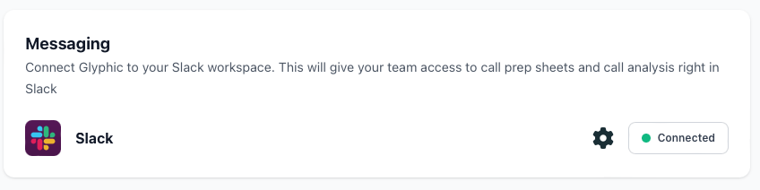
-
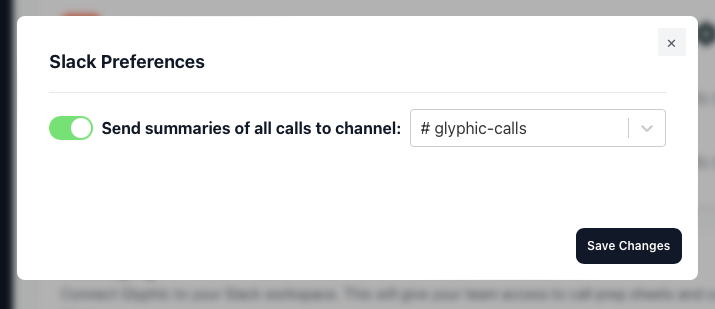
Select a Slack Channel: Click on the ⚙️ next to the connect button, switch on Slack call summaries and choose a specific channel where you want Airspeed to post them.
-
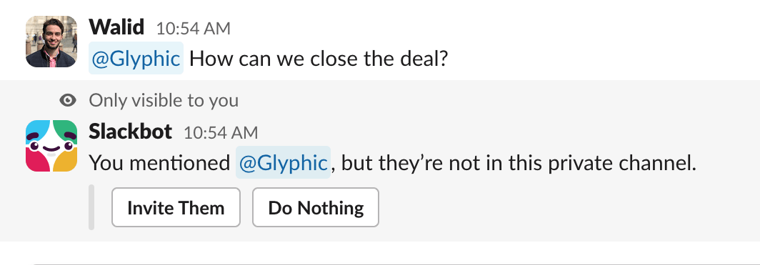
Talk to Airspeed in Slack: After each call, Airspeed will automatically post a summary in the chosen channel. Mention @Airspeed in your reply, and ask anything related to that call.
Important: In Slack, make sure to invite the Airspeed app to the channel to be able to mention it in your messages within that channel. Slack may prompt you to do so when you mention it for the first time; just click on “Invite Them”, or you can click on the channel’s name at the top, go to “Integrations”, and then “Add apps”.
We’d love to hear your ideas on what else you’d like to do right from Slack! As always, please get in contact with our product team at [email protected]