
🧠🐘 A Smarter Ask Airspeed now with Memory and Automatic filters: Learn, Adapt, and Sell Better
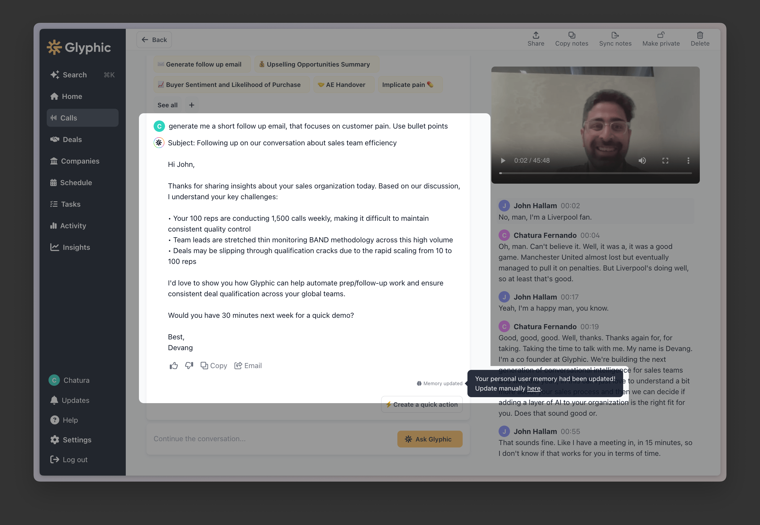
Ask Airspeed just leveled up. Now, it doesn’t just answer your questions; it learns, adapts, and evolves with you, making every response sharper and more relevant. Personal memory Gets Smarter Over Time - Learns your...
Ask Airspeed just leveled up. Now, it doesn’t just answer your questions; it learns, adapts, and evolves with you, making every response sharper and more relevant.
Personal memory
Gets Smarter Over Time - Learns your style, goals, and key insights to improve responses.
🧍Individual and personal - Your memory is private and only affects your UI.
🔹 Adapts to Your Style - Matches your tone, messaging, and language
🧠 Stores Key Insights - Product details, objections, competitor mentions & more.
🏭 Understands Your Language - Picks up phrases and terminology you prefer
How do I get started?
🧚♀️ All Automatic - Updates happen as you Ask Airspeed questions (you’ll see a 🧠 Memory updated). You can manually manage and update your memory: Settings > Personal > scroll to the Ask Airspeed memory section
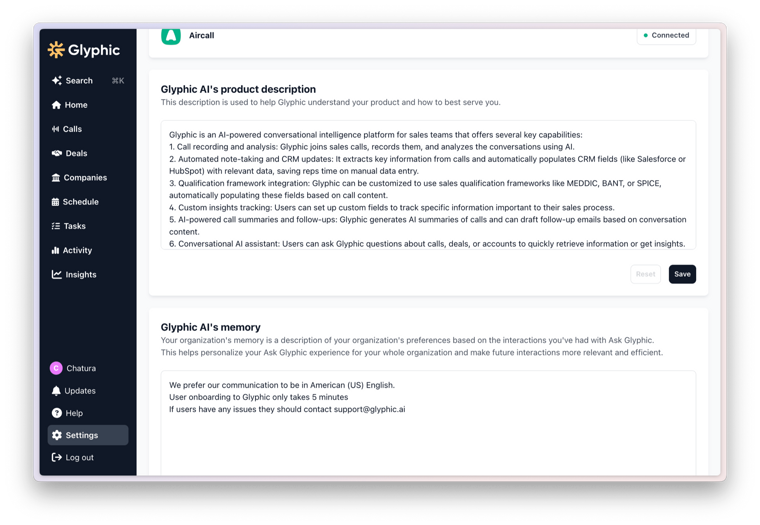
Organizational memory Drive consistency and build the Hive knowledge - No more silos
🚀 Define your product - Define current and future releases to generate more context-aware responses for your reps.📣 Voice and Tone - Ensure all follow up emails automatically fit your brand
🏭 Define Your Industry - Define specific terminology
⚠️ Common objections - Define past successful methods of dealing with common objections
📚 Institutional Knowledge Retention - Retain insights about process, requirements, etc across teams
How do I get started?
As a Admin user, Navigate to Settings > Organisational > scroll to the Product Description and memory sections and start adding your additional context.
This product wouldn’t be what it is today without the insights of our customers. If you have feedback, we’d love to hear from you at [email protected].